The Driving For Dollars App
- 2.8
- Rating
- 10.00K
- Installs
- Free
- Price

 Analysis by App-foxy
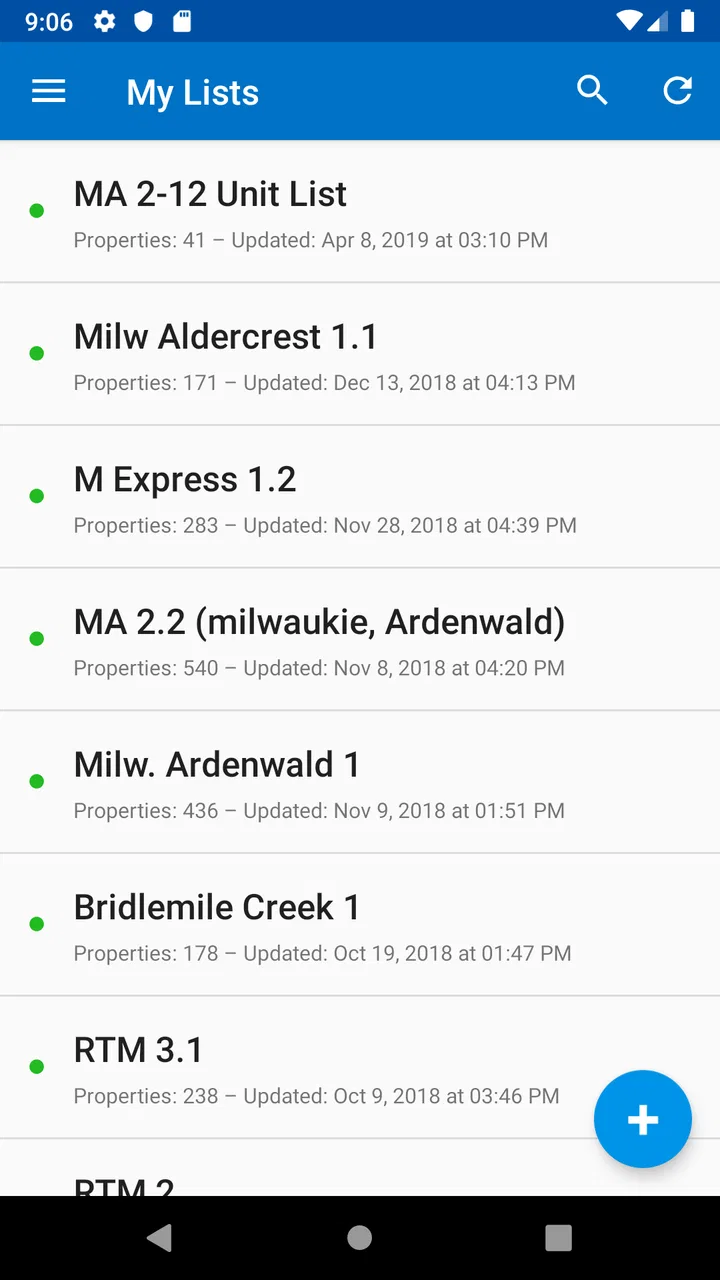
I approached Driving For Dollars App as a practical tool for someone who finds potential real-estate opportunities while moving around a neighborhood. It is a free business app from Driving For Dollars App LLC, aimed at turning property scouting into a more organized direct-mail workflow. The idea is easy to understand: instead of relying only on office research or memory, you can identify properties in the field and use those observations to guide follow-up.
That sounds useful, but it is important to set the right expectation before installing it. This is not a complete real-estate marketplace, a property valuation service, or a replacement for careful research. Its value depends on how consistently you use it during your own scouting routine. I found it most relevant for investors, wholesalers, and small teams who already have a reason to look for possible leads and want a mobile companion for that process.
What the app is really useful for
The app sits in the business category, but its working environment is much more specific than that label suggests. You are likely to use it while driving or walking through an area, noticing properties that appear neglected, vacant, unusually maintained, or otherwise worth investigating. Rather than trying to remember every address later, the app is intended to help connect the observation in front of you with the next marketing step.
You May Also Like

 Blood Strike: 2.5 Anniversary
Blood Strike’s Loadouts Turn Every Drop Into a Tactical Gamble
A close look at Blood Strike’s custom loadouts: how fast access to signature weapons reshapes its battle royale rhythm, rewards preparation, and narrows the gap between fights.

 Pandora - Music & Podcasts
Pandora’s Music Is Easy to Start, but Harder to Recover
Pandora’s strength is its low-effort path from a seed to a station. Its weak spot is how much confidence it asks you to place in connection, setup, and quiet recovery.

 8 Ball Pool
8 Ball Pool Is Built on Rivalries, Rematches, and Routine
A close look at the rivalries, rematches, shared routines, and unanswered safety questions that turn a quick pool match into a persistent mobile community.

 Samsung Music
Samsung Music’s Quiet Strength Is Playing What You Already Own
Its reach comes less from spectacle than from dependable access to a personal library. That simplicity is both the app’s strongest retention engine and its ceiling.

 AccuWeather: Weather Radar
AccuWeather Review: A Quick, Clear Forecast for Everyday Decisions
For everyday plans, the best forecast is the one you can understand quickly. AccuWeather makes rain timing, radar, and local conditions easy to act on, with a few trade-offs.

 Hill Climb Racing
Why Hill Climb Racing Still Turns Crashes Into One More Run
A tiny car, a bumpy hill and one more upgrade: Hill Climb Racing keeps resurfacing because its simple chaos makes every near-miss feel personal.
More From Our News Desk
View All News


That distinction matters. A person searching for rental listings, mortgage information, or home-buying advice will probably find a conventional real-estate app more suitable. This tool is aimed at the earlier, more active stage of prospecting: finding possible opportunities before deciding whether they deserve deeper research.
My first useful insight is that the app should be treated as a lead-capture habit, not as an automatic lead generator. A property that looks promising from the street is only a starting point. Ownership, occupancy, condition, local rules, and the owner’s willingness to respond still need attention outside the initial scouting action. The app can help you avoid losing the thread, but it cannot replace judgment.
The free download makes it easy to test the workflow without committing at the beginning. At the same time, the listing includes in-app purchases ranging from $19.99 to $399.99 per item, so I would not move toward paid options until the basic process fits the way you already work. The right question is not whether a larger package sounds attractive; it is whether you are generating enough worthwhile prospects to justify spending more.
Who will get the most from it
I would put this on the shortlist for a new investor who wants to build a disciplined scouting routine, especially if driving through target neighborhoods is already part of the plan. It can also make sense for an experienced operator who needs a simple way to keep field observations connected to later outreach rather than leaving everything in scattered notes.
A small team may benefit from the same structure, provided everyone agrees on what makes a property worth recording and what happens after a record is created. Without that shared process, the app can become another place where incomplete leads collect.
I would skip it if your main need is instant property data, automated valuation, detailed market analytics, or a polished customer relationship management system. Those jobs call for different tools. I would also hesitate if you rarely scout in person. The concept is strongest when the user is physically noticing properties and wants to act on those observations soon afterward.
Getting started without overcomplicating the setup
The app supports devices running Android 6.0 or later, and the current version is 2.1.2. After installing, I would begin with a very small test rather than trying to map an entire city. Choose one familiar area where you can recognize the difference between an ordinary property and one that deserves a closer look.
Before heading out, decide what your personal scouting criteria are. For example, you might focus on visible neglect, signs that a property is unoccupied, or homes that appear to need substantial exterior work. The specific criteria are yours to define, but writing them down mentally makes the first session much more consistent. Otherwise, you may record whatever catches your eye and later struggle to remember why it seemed important.
A useful preparation step is to separate observation from conclusion. Record what you can actually see, such as overgrown landscaping or an apparently empty building, rather than labeling the owner as motivated or distressed. That small discipline prevents a common real-estate mistake: turning a visual impression into a claim that has not been checked.
For a first session, I would aim for a handful of carefully chosen prospects instead of filling the app with every property on a street. This creates a manageable review queue and lets you learn whether the app’s flow feels natural while you are moving. It also makes the next stage—checking and prioritizing—far less tiring.
Safety should remain part of the setup. Do not interact with occupants, stop in unsafe places, or let the phone distract you while driving. If you need to enter information, do it only when properly parked or when walking in a suitable public setting. A scouting app is not worth creating a traffic risk or an uncomfortable encounter.
The first meaningful action
The first success I would look for is not a completed mailing campaign. It is a clean, usable prospect that you can revisit later and still understand. When you notice a property, capture it promptly, add enough context to explain why it caught your attention, and then continue. The goal is to preserve the connection between the location and your original observation.
That timing is more important than it sounds. If you wait until the end of the drive, several addresses may blur together, and the reason behind each entry can disappear. Recording the prospect close to the moment of discovery gives your later follow-up a better starting point.
Here is a realistic routine. Imagine that I spend an afternoon checking a neighborhood where I am looking for possible off-market opportunities. I pass a house with obvious exterior neglect and stop legally a safe distance away. I record it while the observation is fresh, add a short note describing the visible issue, and continue to the next location. That evening, I review the entries and separate properties that deserve research from those that were merely unusual.
The important trade-off is speed versus detail. Too little information leaves you with a mysterious address and no memory of its significance. Too much typing slows the scouting route and encourages you to postpone entries. I would use concise descriptions that answer one question: Why did I save this property?
Another non-obvious improvement is to create a follow-up rhythm immediately. Do not let saved prospects sit indefinitely. Set aside a later block for checking public information, confirming whether the property fits your strategy, and deciding whether direct mail is appropriate. The app is more useful when every field observation has a next decision attached to it.
Turning a saved prospect into a sensible mailing decision
The direct-mail angle is where this app differs from a basic notes application. A note-taking app can preserve an address and a comment, but it does not naturally represent the connection between scouting and outreach. Here, the intended workflow encourages you to think about what happens after identification.
Still, I would not send mail simply because a property was recorded. First, verify that the address is correct and investigate the situation using reliable sources. Then consider whether the message is relevant, respectful, and compliant with applicable rules. A neglected-looking house may have a perfectly active owner, and an apparently vacant property may have circumstances you cannot see from the road.
This is also where a spreadsheet or customer relationship tool may be better for some users. If you need extensive custom fields, detailed conversation histories, task assignments, or reporting across a large operation, a specialized system will usually offer more control. The app’s advantage is the field-to-follow-up idea, not necessarily deep business administration.
For a beginner, that can actually be a strength. A huge system often creates setup work before the user has developed a repeatable process. Starting with a focused scouting tool can help you learn which information you genuinely need. Once your activity grows, you can decide whether the app remains sufficient or should feed into a broader workflow.
Where first-time users may feel friction
The most likely confusion is understanding what counts as a meaningful result. Installing the app does not produce opportunities by itself. The result comes from combining local knowledge, careful observation, accurate recording, later verification, and thoughtful outreach. If you expect a property database or instant owner response, the experience may feel disappointing even when the app is working as intended.
Another point to keep clear is the difference between a prospect and a qualified lead. A prospect is something worth checking. A qualified lead has survived additional research and fits your buying or outreach criteria. Keeping those labels separate protects you from sending expensive or poorly targeted mail based on a quick visual impression.
The average rating is 2.8 from around 65 ratings, with around 44 written reviews. I would take that as a reason to approach the app practically rather than assuming it will feel polished for every user. The audience is relatively specialized, and field workflows can expose frustrations that do not appear during a quick store-page glance.
Its reach is also modest compared with mass-market business tools, with over 10 thousand installs. That does not determine whether it will work for you, but it does suggest that I would test the exact workflow personally before building an important operation around it.
One friction point worth anticipating is the cost decision. The app itself is free, while optional purchases can reach $399.99 per item. For a beginner, that creates a strong reason to start with a limited experiment: scout one area, review the quality of the saved prospects, and measure whether the follow-up process is actually happening. Paying more before proving that habit would be backwards.
The Everyone content rating makes the app broadly accessible from an age-classification standpoint, but the work it supports is still professional and responsibility-heavy. Younger or inexperienced users should understand that direct mail involves real people, real addresses, and legal or ethical considerations. A simple interface should not encourage careless contact.
Three habits that make the workflow stronger
- Use a consistent observation rule: decide in advance what visual signs justify saving a property, then apply that rule across the whole route instead of choosing randomly.
- Review in batches: separate field collection from evening research so you can stay attentive outdoors and make calmer decisions later.
- Keep evidence and assumptions apart: describe what was visible, then record ownership or motivation only after independent checking.
These habits are more valuable than simply recording a larger number of addresses. They reduce noise, make later decisions easier, and help you judge whether the app is contributing to actual progress rather than just creating a longer list.
How it compares with familiar alternatives
Compared with a paper notebook, the app should be more convenient for connecting a location-based observation to later direct-mail work. A notebook can be flexible, but it depends heavily on handwriting, manual organization, and remembering what each note referred to. The app’s specialized purpose gives the process a clearer direction.
Compared with a generic notes app, the difference is less dramatic. Notes may be enough for a very small scouting experiment, especially if you already have a dependable method for organizing addresses and follow-up. The specialized app becomes more appealing when you want the scouting activity itself to remain tied to a real-estate prospecting routine.
Compared with a full CRM, this is likely to feel narrower. A CRM is preferable when multiple people need to update the same leads, track communication stages, assign tasks, and report on outcomes. On the other hand, a CRM can be excessive for someone who is still learning where to scout and what kinds of properties fit their strategy.
Compared with real-estate search platforms, the purpose is different rather than directly competitive. Search platforms help you browse listed properties and market information. This app is built around finding possibilities through your own local observation. If your strategy depends on listed inventory, start with the platform designed for that. If your edge comes from noticing properties before they enter a conventional search, this app’s approach is more relevant.
What to do after the first trial
After one short scouting session, I would review every saved prospect and ask whether I can explain the next action for each one. If several entries are vague, improve the note-taking rule before increasing the area. If the entries are clear but none justify further research, reconsider the neighborhood or the criteria rather than blaming the app immediately.
The next step should be a repeatable loop: scout, review, verify, prioritize, and contact only when the situation makes sense. That loop is the real product experience. The application can support the transition between the first four stages, but your research and judgment determine whether the work leads anywhere.
I would also compare the time spent using it with the quality of the prospects it helps preserve. A tool can be useful even if it does not produce immediate results, provided it reduces forgotten observations and improves consistency. If it adds duplicate work or leaves you maintaining the same information in several places, a simpler notes workflow may be the better choice.
For someone new to driving for dollars, the reassuring part is that you do not need to master a large system on day one. Start with one neighborhood, a small set of criteria, and a clear review session afterward. That approach reveals whether the app fits your habits without forcing an early purchase or an oversized commitment.
My overall view is cautiously positive for the right user. It is best understood as a field-scouting companion, not a complete real-estate business platform. I like the way its purpose points from noticing a property toward direct-mail follow-up, and the free entry point makes a personal trial reasonable. But the modest average rating, the specialized audience, the optional purchase range, and the need for substantial work outside the app all argue for testing before investing heavily.
If you already drive target neighborhoods and often lose track of promising properties, I think it is worth trying. If you want instant property intelligence, advanced team management, or a ready-made list of motivated owners, I would choose a different category of tool. Used with careful notes, safe scouting, and proper verification, Driving For Dollars App can give a beginner a concrete way to turn casual observations into an organized prospecting routine.
FAQs for The Driving For Dollars App
01What is the Driving for Dollars app used for?
Driving for Dollars is a real estate prospecting app designed to help investors find potential off-market properties while traveling through neighborhoods. Users can identify houses that may need repairs or appear vacant, save property details, organize leads, and plan follow-up actions. It is mainly intended for real estate investors, wholesalers, agents, and other professionals looking for new property opportunities.
02How does the Driving for Dollars app help me find properties?
The app uses your phone’s location and mapping features to help you record properties as you drive or walk through an area. When you notice a property that may be a good lead, you can mark it on the map, add notes, and sometimes attach photos or other information. This creates a digital list of prospects that can be reviewed and managed later instead of relying on handwritten notes.
03Can I use Driving for Dollars without an internet connection?
The app’s main mapping, location, and lead-management functions generally work best with an active internet connection and location services enabled. Depending on the version and subscription, some information may be available temporarily offline, but users should not assume that every feature will work without data access. It is recommended to download or prepare maps in advance and synchronize saved leads when connectivity returns.
04Is Driving for Dollars free to download and use?
The application may be available to download at no initial cost, but important tools can depend on a paid plan, trial period, or in-app subscription. Features such as advanced property data, skip tracing, marketing tools, team collaboration, or larger lead limits may not be included in the basic version. Before subscribing, review the current pricing, renewal terms, and cancellation policy shown in the app store.
05What should I know about privacy and legal use of the app?
Driving for Dollars may request access to your location, camera, storage, and other phone permissions so it can record properties and organize field notes. Only grant permissions that you are comfortable using, and read the app’s privacy policy before creating an account. When visiting neighborhoods, respect private property, traffic laws, local solicitation rules, and applicable regulations concerning property data and contacting owners.
Pros
- Helps organize property leads while driving through unfamiliar neighborhoods.
- Photo and location tools make it easier to document potential investment properties.
- Useful for investors building a targeted list of off-market homes.
- Map-based workflow can reduce reliance on separate note-taking apps.
- Supports a more systematic approach to local real estate prospecting.
Cons
- Best suited to real estate investors
- not ordinary drivers or home buyers.
- Accurate results depend on current property and mapping data.
- Frequent GPS use may noticeably increase battery consumption.
- Some useful features may require a paid plan or additional subscription.
- Entering detailed property information on a phone can feel time-consuming.

The Driving For Dollars App
Gallery